Apple expands “DarkSword” patches to iOS 18.7.7
Apple has expanded its latest iOS 18 security update to protect a much broader range of iPhones and iPads against real-world DarkSword attacks capable of compromising a device through a single website visit. After security researchers disclosed details about the exploit chain and proof-of-concept code appeared on GitHub, Apple quietly updated its March 24 security bulletin and extended coverage beyond a small group of legacy devices. The company initially released iOS/iPadOS 18.7.7 for older hardware such as the iPhone XS, XS Max, XR, and 7th-generation iPad, but newer devices had stopped receiving incremental iOS 18 patches because they were eligible for iOS 26, leaving many users exposed to risk.
DarkSword is a sophisticated, full-chain exploit kit that links together six vulnerabilities across WebKit, Safari, the dynamic loader, and the iOS kernel, enabling attackers to move from a simple webpage visit to full device compromise. The exploit chain has reportedly been observed in real-world campaigns since at least November 2025, including operations attributed to commercial spyware providers and state-sponsored groups. Because the attack requires no interaction beyond loading a malicious webpage or advertisement, even cautious users could unknowingly expose sensitive information such as photos, messages, or crypto wallets.
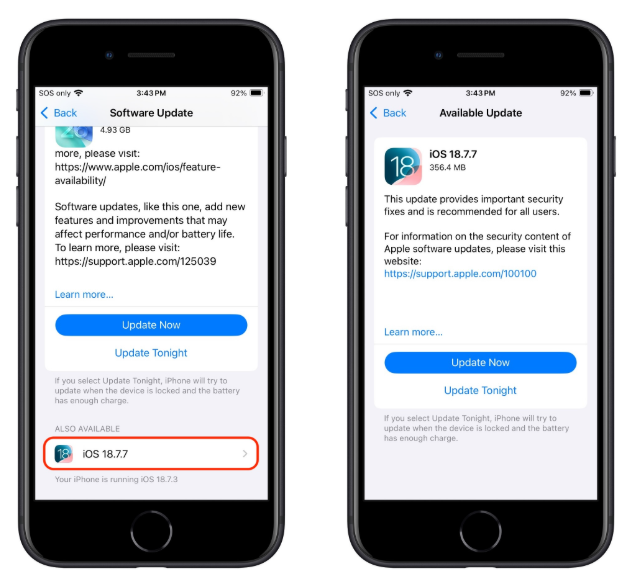
To reduce exposure, users should immediately check whether their device is running the latest available update. On iPhone or iPad, go to Settings > General > Software Update to see available versions and follow the prompts to install them. Users who prefer to remain on iOS 18 can scroll to the “Also Available” section and manually choose iOS 18.7.7 instead of upgrading to iOS 26. Enabling Automatic Updates on the same screen ensures future patches are applied promptly, helping prevent vulnerabilities from accumulating over time.
Additional precautions can further improve security, especially for individuals at higher risk such as journalists, activists, or those handling sensitive financial or professional data. Apple’s Lockdown Mode can be enabled through Settings > Privacy & Security > Lockdown Mode, though it reduces some functionality in exchange for stronger protection. Users are also advised to avoid suspicious links, use reputable anti-malware and content-blocking tools, enable multi-factor authentication, store significant crypto assets in hardware wallets, review app permissions regularly, and rely on password managers with strong authentication features to safeguard important accounts and personal data.
Stay Updated
Keep yourself updated with the latest tech trends, events, products, insights and much more, only with Dab Lew Tech Pakistan.
source